1. Apply for Plugin APPID
Fill out the application form for plugin access and provide it to the business team to apply for plugin access authorization.
2. Device Introduction
2.1 Overview of Scale-side Users
The pull-out eight-electrode device is a scale-side device with users (abbreviated as 8 users), where 8 represents 8 scale-side users. The scale can store user profiles and reference weights for 8 users, enabling automatic user identification based on reference weight during offline measurements (without Bluetooth connection), and display measurement indicators such as BMI and body fat percentage on the scale surface.
For the 8 user information slots stored on the scale:
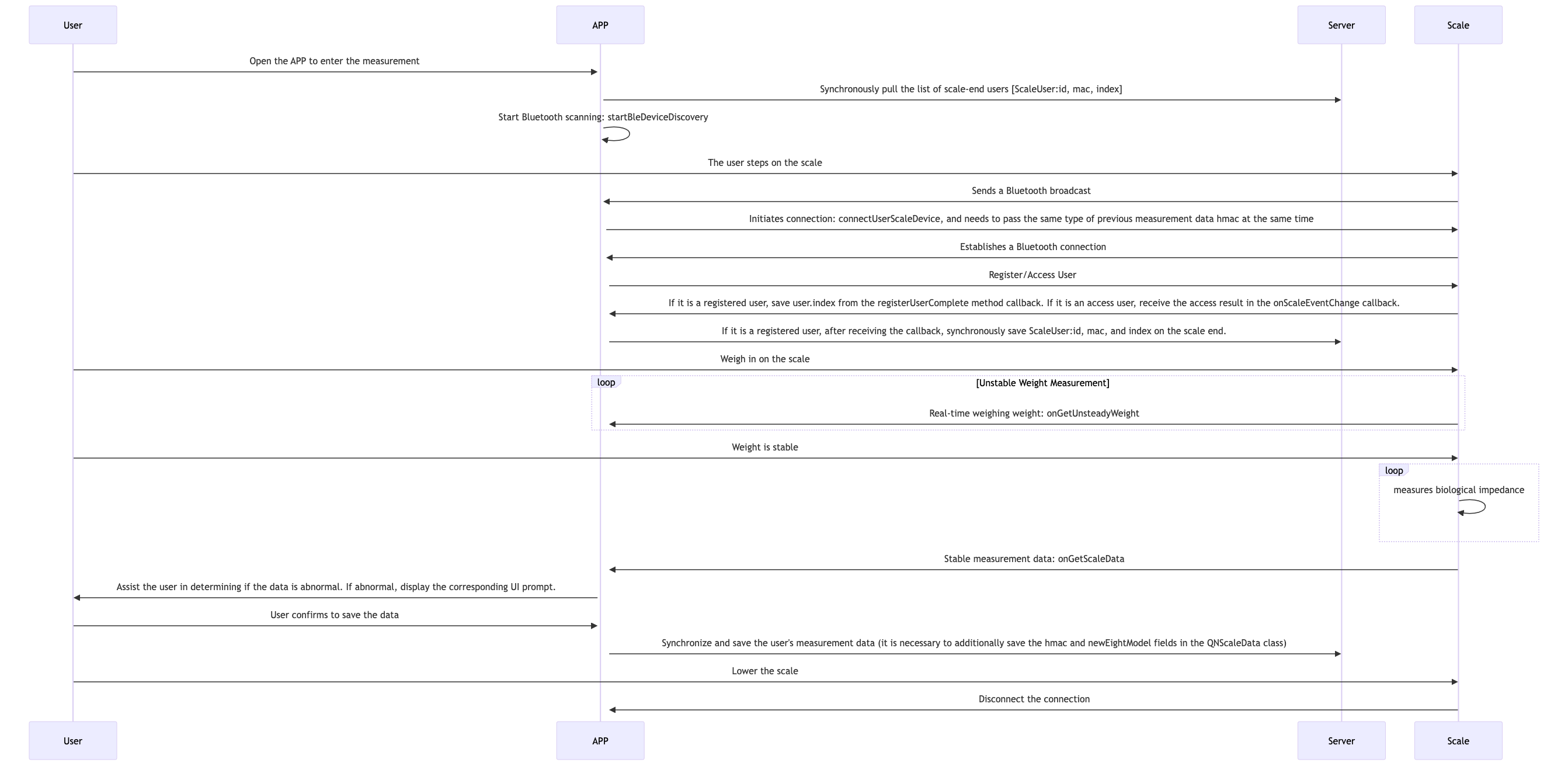
Registration is used to send a command to the scale to create a new user. When a user who has not been registered on this device uses it for the first time, they need to register with the scale. This is done in the config parameter of the connectUserScaleDevice function by leaving the curUser's index unassigned for user registration. When device registration is complete, a callback will inform of the storage slot value assigned by the scale to this registered user, which is the index field in the user object of the registerUserComplete callback function. After obtaining the index, it is recommended to associate and store the user's unique identifier, index, and mac address on the server.
When a registered user connects via Bluetooth again before issuing a deletion command to the scale, they can directly measure by accessing via index without re-registering. This is done in the config parameter of the connectUserScaleDevice function by filling in the index field of curUser with the index corresponding to this user on this device.
When you need to delete a user already registered on the device, use the userlist in the config parameter of the connectUserScaleDevice function. Note that scale-side users not included in this data will be deleted, so ensure the correctness of the user object index in the userlist.
Scale-side automatic user identification logic:
When the scale measures in offline mode, it polls through the measured weight result against the registered users on the scale. If the absolute difference between the reference weight of only one user and the current measured weight is within 2kg, it is considered to be that user's measurement data. The scale uses that user's information for calculation, displays BMI and body fat percentage on the scale surface, and stores the measurement data on the scale. This data is uploaded when that user next connects via Bluetooth to complete a measurement. The registered user's reference weight is updated each time a Bluetooth connection accesses that user and completes a measurement, and is also updated when offline mode measurements identify that user.
When the device cannot identify a specific user during offline mode measurement, this measurement data is stored as unknown stored data on the scale and is returned as a callback upon completion of any subsequent Bluetooth connection measurement.
2.2 Workflow Illustration
2.3 Measurement Data Processing
If the newEightModel field in the QNScaleData measurement data object is 1, you can determine whether this measurement data is abnormal through the eightIsAbnormal field. If abnormal, you can further determine the specific abnormal reason through the eightReasonMask field, thereby providing users with friendly UI prompts at the business level, explaining the reason for this abnormal measurement and guiding correct measurement posture. For details, please refer to Appendix - Eight Electrode Abnormal Measurement Prompts
When receiving measurement data, the business layer can also make its own judgment about indicator value differences (for example, compared to the previous measurement data, if weight differs by 4kg or body fat percentage differs by 3%, it can be considered an abnormal measurement), and prompt the user whether to save or remeasure.
When saving measurement data at the business level, you need to additionally save the hmac and newEightModel fields from the measurement data for judgment and input parameters during the next connection measurement.
3. Plugin Integration Steps
iOS Integration Guide
Android Integration Guide
4. Device Measurement Indicators
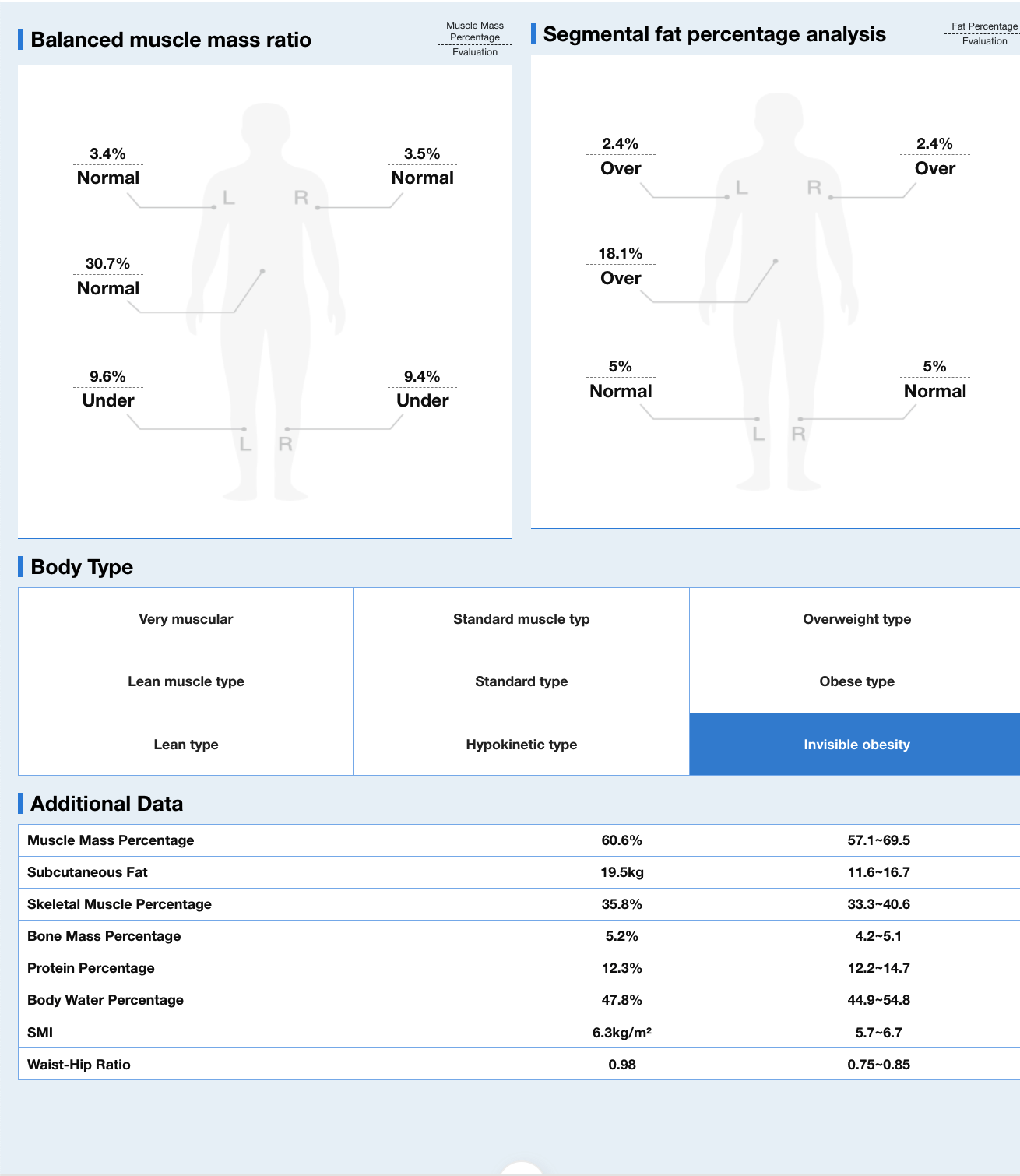
For eight-electrode devices, the SDK will uniformly output the following 50 indicators by default: weight, BMI, body fat percentage, fat mass, subcutaneous fat percentage, subcutaneous fat mass, visceral fat level, body water percentage, body water mass, skeletal muscle percentage, skeletal muscle mass, limb skeletal muscle index, bone mass, bone mass percentage, basal metabolic rate, body type, protein percentage, protein mass, lean body mass, muscle mass, muscle mass percentage, body age, score, waist-hip ratio, obesity degree, obesity level, target weight, weight control, fat control, muscle control, left arm muscle mass, right arm muscle mass, trunk muscle mass, left leg muscle mass, right leg muscle mass, left arm fat mass, right arm fat mass, trunk fat mass, left leg fat mass, right leg fat mass, left arm muscle percentage, right arm muscle percentage, trunk muscle percentage, left leg muscle percentage, right leg muscle percentage, left arm fat percentage, right arm fat percentage, trunk fat percentage, trunk fat percentage, left leg fat percentage. When integrating the device, you can retrieve and save values as needed.
5. Measurement Abnormal UI Prompts
If the page displays abnormally after jumping, you can refresh the webpage. Appendix - Eight Electrode Abnormal Measurement Prompts
6. Measurement Report Templates
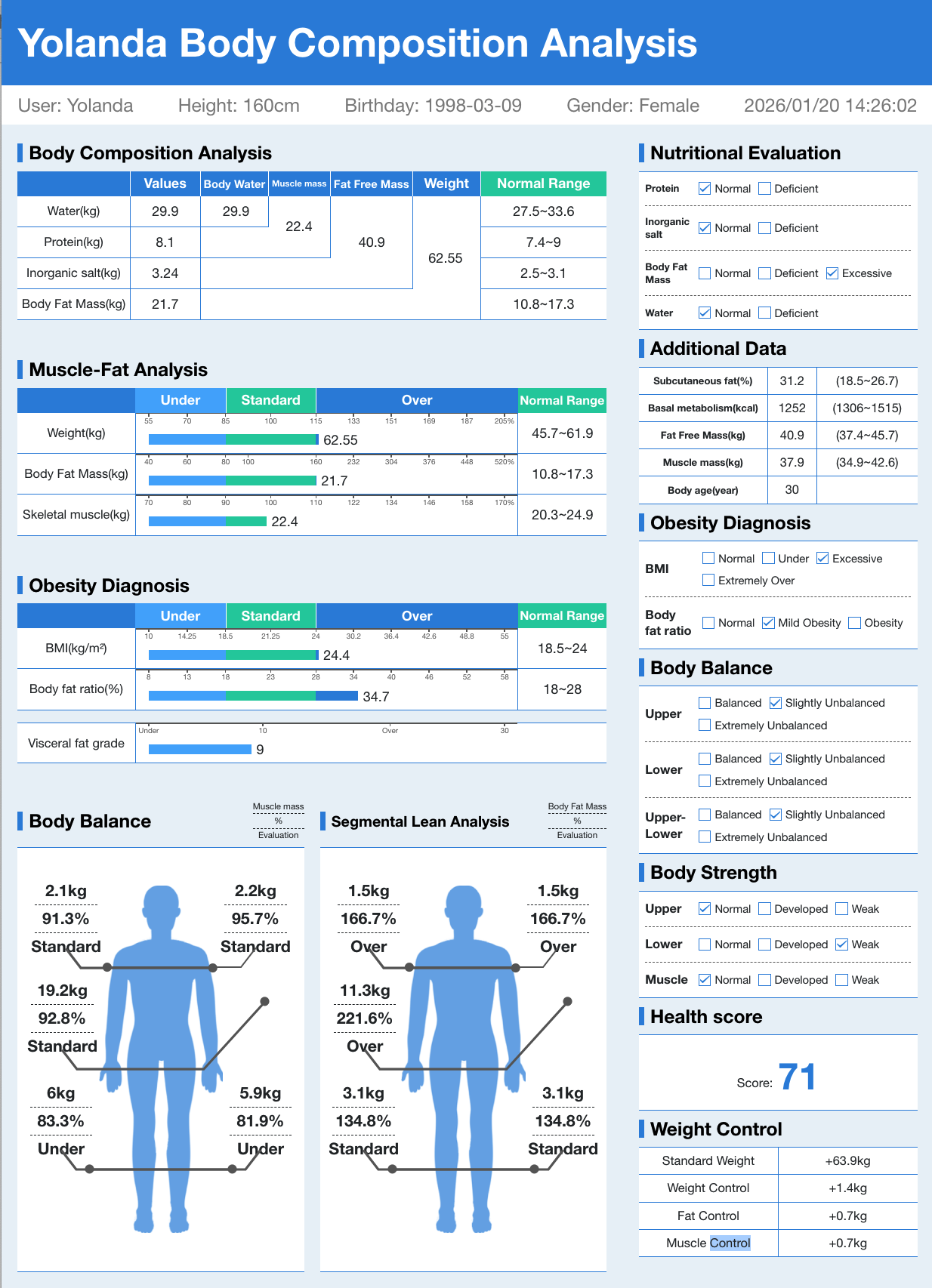
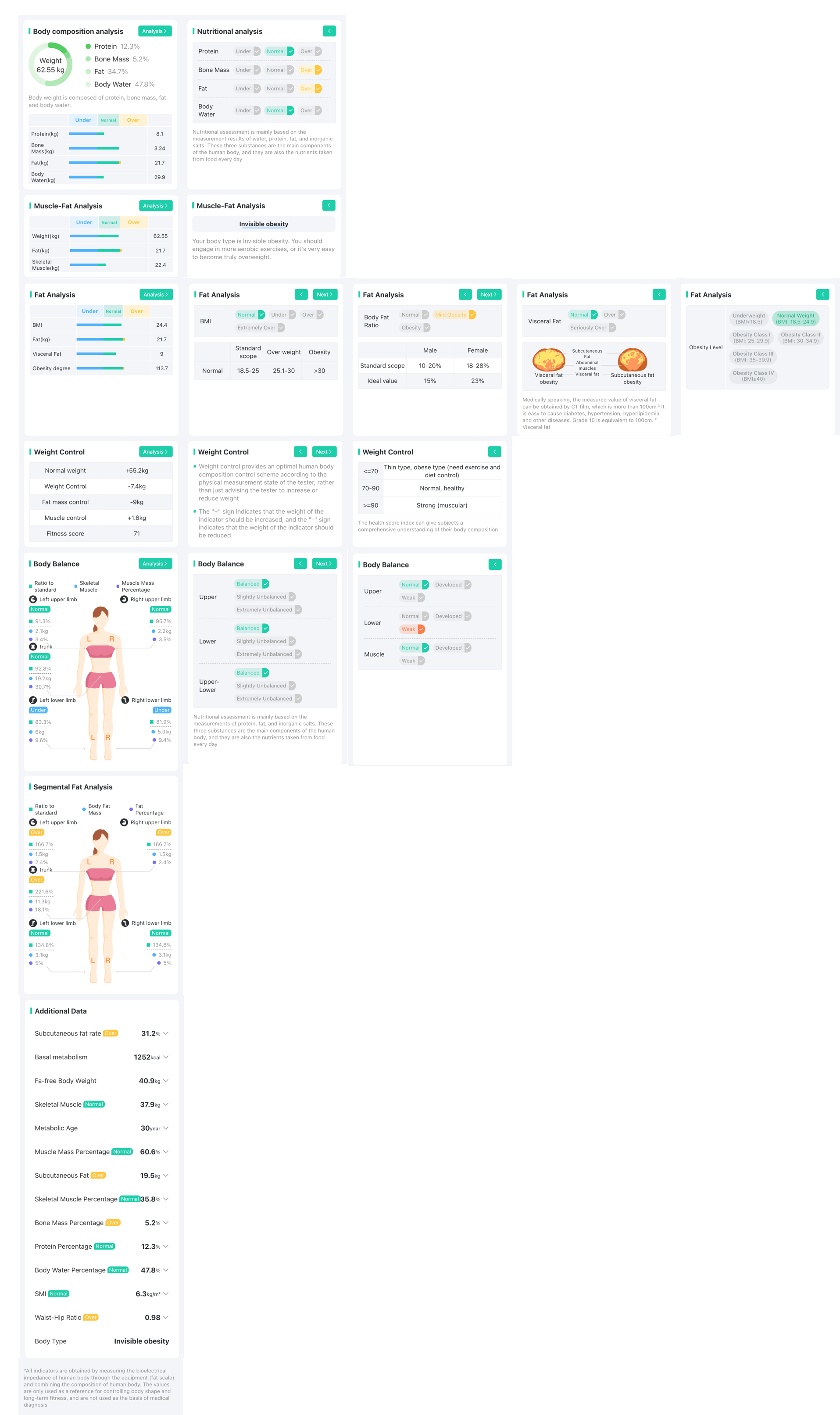
For eight-electrode measurement reports, we provide two template versions for both Web-based deep analysis reports and PDF reports with 34 indicators and 50 indicators, simplifying the development cycle. You can generate previews or view compiled products according to the README.md guide in the template project we provide (please contact your business manager to obtain the project template). For 50 indicators, you need to add show_50_flag and whr parameters; see the template project for details. If you need to develop the corresponding reports using iOS/Android native technology stacks, you can obtain our native indicator standard library from your business manager, which will output all indicator information involved in the reports.
If you have minor adjustment needs for the template report style, you can directly modify the layout in our template project. If you plan to adopt a completely new style, you can also extract the eight-electrodes-report-standard file from the libs folder in the project template, which will output all indicator standards involved in the reports.
Note: 50 indicators require SDK upgrade to V2.32.0 or higher
34 Indicator Report
Deep Analysis Report Style:

PDF Report Style:
50 Indicator Report
Deep Analysis Report Style:
PDF Report Style: